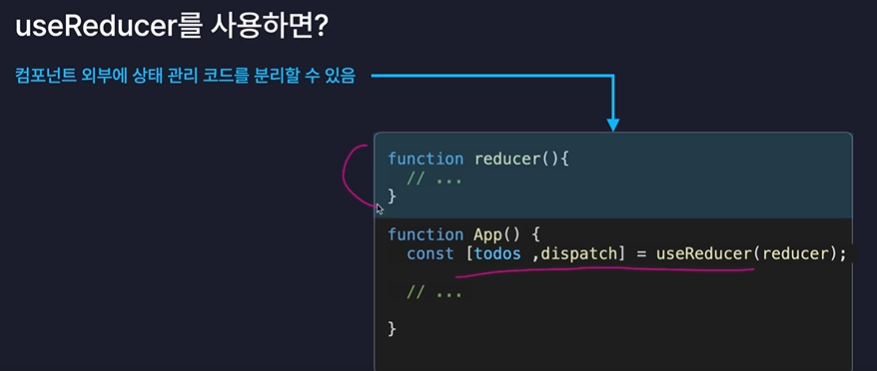
9.1) useReducer는 React의 상태 관리 Hook 중 하나로,
useState보다 복잡한 상태 변경 로직을 깔끔하게 처리할 때 사용합니다.
Exam.jsx
import { useReducer } from "react";

// reducer : 변환기
// -> 상태를 실제로 변화시키는 변환기 역할
function reducer(state, action) {
  switch (action.type) {
    case "INCREASE":
      return state + action.data;
    case "DECREASE":
      return state - action.data;
    default:
      return state;
  }
}

const Exam = () => {
  // dispatch : 발송하다, 급송하다
  // -> 상태 변화가 있어야 한다는 사실을 알리는, 발송하는 함수
  const [state, dispatch] = useReducer(reducer, 0);

  const onClickPlus = () => {
    // 인수: 상태가 어떻게 변화되길 원하는지
    // -> 액션 객체
    dispatch({
      type: "INCREASE",
      data: 1,
    });
  };

  const onClickMinus = () => {
    dispatch({
      type: "DECREASE",
      data: 1,
    });
  };

  return (
    <div>
      <h1>{state}</h1>
      <button onClick={onClickPlus}>+</button>
      <button onClick={onClickMinus}>-</button>
    </div>
  );
};

export default Exam;
- useReducer로 state(현재 값)와 dispatch(명령 전달 함수)를 생성한다.
- reducer 함수는 액션의 type에 따라 state를 증가(INCREASE) 또는 감소(DECREASE)시킨다.
- onClickPlus는 dispatch로 { type: "INCREASE", data: 1 }을 보낸다.
- onClickMinus는 dispatch로 { type: "DECREASE", data: 1 }을 보낸다.
- 버튼 클릭 시 reducer가 실행되어 state가 업데이트되고, 화면에 새로운 값이 표시된다.
9.2) 투두리스트 업그레이드
App.jsx
import "./App.css";
import { useRef, useState, useReducer } from "react";
import Header from "./components/Header";
import Editor from "./components/Editor";
import List from "./components/List";

const mockData = [
  {
    id: 0,
    isDone: false,
    content: "React 공부하기",
    date: new Date().getTime(),
  },
  {
    id: 1,
    isDone: false,
    content: "빨래하기",
    date: new Date().getTime(),
  },
  {
    id: 2,
    isDone: false,
    content: "노래 연습하기",
    date: new Date().getTime(),
  },
];

function reducer(state, action) {
  switch (action.type) {
    case "CREATE":
      return [action.data, ...state];
    case "UPDATE":
      return state.map((item) =>
        item.id === action.targetId
          ? { ...item, isDone: !item.isDone }
          : item
      );
    case "DELETE":
      return state.filter(
        (item) => item.id !== action.targetId
      );
    default:
      return state;
  }
}

function App() {
  const [todos, dispatch] = useReducer(reducer, mockData);
  const idRef = useRef(3);

  const onCreate = (content) => {
    dispatch({
      type: "CREATE",
      data: {
        id: idRef.current++,
        isDone: false,
        content: content,
        date: new Date().getTime(),
      },
    });
  };

  const onUpdate = (targetId) => {
    dispatch({
      type: "UPDATE",
      targetId: targetId,
    });
  };

  const onDelete = (targetId) => {
    dispatch({
      type: "DELETE",
      targetId: targetId,
    });
  };

  return (
    <div className="App">
      <Header />
      <Editor onCreate={onCreate} />
      <List
        todos={todos}
        onUpdate={onUpdate}
        onDelete={onDelete}
      />
    </div>
  );
}

export default App;
- useReducer로 todos 상태와 dispatch 함수를 만들어 할 일 목록을 관리한다.
- reducer는 CREATE, UPDATE, DELETE 액션에 따라 할 일 목록을 추가, 완료 여부 토글, 삭제한다.
- onCreate, onUpdate, onDelete는 각각 새 할 일 생성, 완료 상태 변경, 삭제 요청을 dispatch로 전달한다.
- Header, Editor, List 컴포넌트가 각각 상단 제목, 입력창, 할 일 목록 화면을 담당한다.
- 사용자가 입력하거나 버튼을 클릭할 때마다 dispatch가 호출되어 todos 상태가 즉시 갱신된다.
10.2) useMemo와 연산 최적화
List.jsx
import "./List.css";
import TodoItem from "./TodoItem";
import { useState, useMemo } from "react";

const List = ({ todos, onUpdate, onDelete }) => {
    const [search, setSearch] = useState("");

    const onChangeSearch = (e) => {
        setSearch(e.target.value);
    };

    const getFilteredData = () => {
        if (search === "") {
            return todos;
        }
        return todos.filter((todo) =>
            todo.content
                .toLowerCase()
                .includes(search.toLowerCase())
        );
    };

    const filteredTodos = getFilteredData();

    const { totalCount, doneCount, notDoneCount } =
        useMemo(() => {
            console.log("getAnalyzedData 호출!");
            const totalCount = todos.length;
            const doneCount = todos.filter(
                (todo) => todo.isDone
            ).length;
            const notDoneCount = totalCount - doneCount;

            return {
                totalCount,
                doneCount,
                notDoneCount,
            };
        }, [todos]);
    // 의존성배열 : deps

    return (
        <div className="List">
            <h4>Todo List 🌱</h4>
            <div>
                <div>total: {totalCount}</div>
                <div>done: {doneCount}</div>
                <div>notDone: {notDoneCount}</div>
            </div>
            <input
                value={search}
                onChange={onChangeSearch}
                placeholder="검색어를 입력하세요"
            />
            <div className="todos_wrapper">
                {filteredTodos.map((todo) => {
                    return (
                        <TodoItem
                            key={todo.id}
                            {...todo}
                            onUpdate={onUpdate}
                            onDelete={onDelete}
                        />
                    );
                })}
            </div>
        </div>
    );
};

export default List;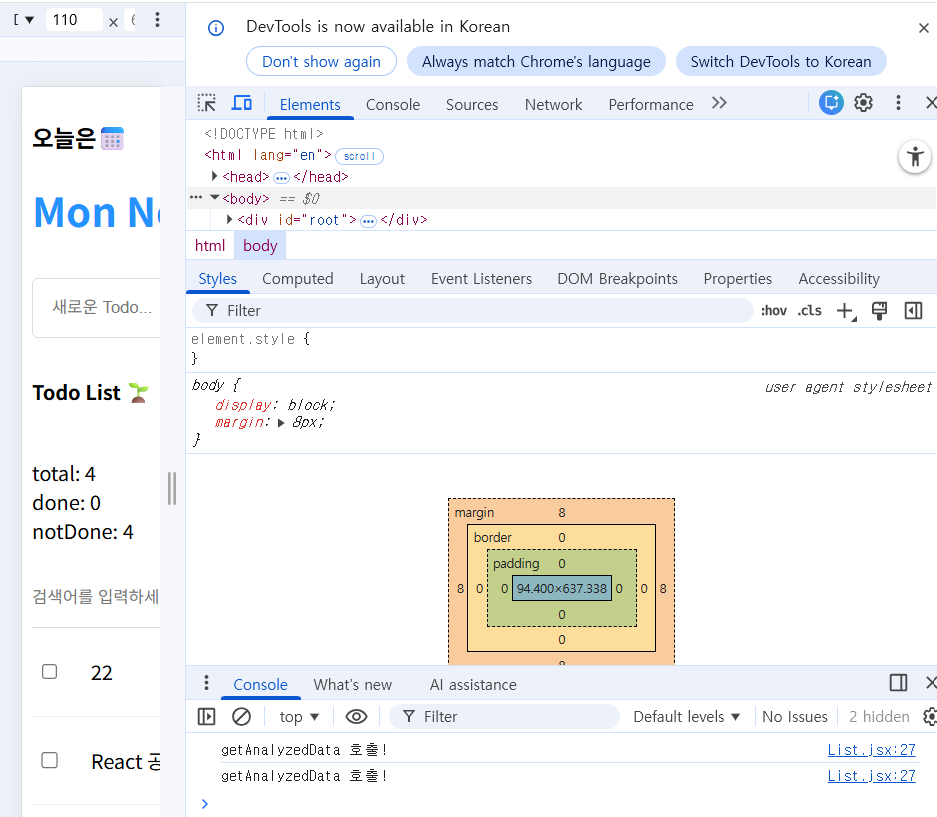
실행화면입니다
10.3) React.memo와 컴포넌트 렌더링 최적화
React.memo
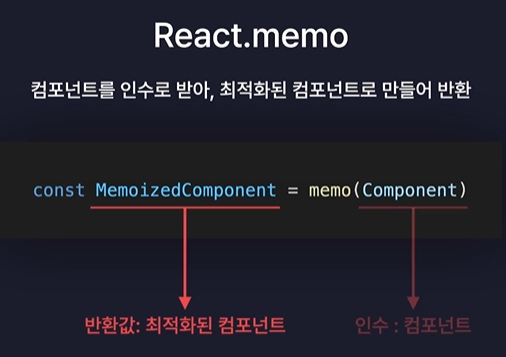
불필요한 렌더링 제거!
Header.jsx
import "./Header.css";
import { memo } from "react";

const Header = () => {
  return (
    <div className="Header">
      <h3>오늘은 📆</h3>
      <h1>{new Date().toDateString()}</h1>
    </div>
  );
};

export default memo(Header);
- Header 컴포넌트가 날짜를 화면에 보여주는 역할을 한다.
- new Date().toDateString()으로 오늘 날짜를 문자열로 변환해 <h1>에 표시한다.
- Header.css를 불러와 스타일을 적용한다.
- memo로 컴포넌트를 감싸, props가 바뀌지 않으면 리렌더링을 막아 최적화한다.
- Header를 export default memo(Header)로 내보내 다른 컴포넌트에서 사용할 수 있게 한다.
TodoItem.jsx
import "./TodoItem.css";
import { memo } from "react";

const TodoItem = ({
  id,
  isDone,
  content,
  date,
  onUpdate,
  onDelete,
}) => {
  const onChangeCheckbox = () => {
    onUpdate(id);
  };

  const onClickDeleteButton = () => {
    onDelete(id);
  };

  return (
    <div className="TodoItem">
      <input
        onChange={onChangeCheckbox}
        readOnly
        checked={isDone}
        type="checkbox"
      />
      <div className="content">{content}</div>
      <div className="date">
        {new Date(date).toLocaleDateString()}
      </div>
      <button onClick={onClickDeleteButton}>삭제</button>
    </div>
  );
};

// 고차 컴포넌트 (HOC)
export default memo(TodoItem, (prevProps, nextProps) => {
  // 반환값에 따라, Props가 바뀌었는지 안바뀌었지 판단
  // T -> Props 바뀌지 않음 -> 리렌더링 X
  // F -> Props 바뀜 -> 리렌더링 O

  if (prevProps.id !== nextProps.id) return false;
  if (prevProps.isDone !== nextProps.isDone) return false;
  if (prevProps.content !== nextProps.content) return false;
  if (prevProps.date !== nextProps.date) return false;

  return true;
});
- TodoItem은 하나의 할 일 항목(체크박스, 내용, 날짜, 삭제 버튼)을 표시하는 컴포넌트다.
- 상위 컴포넌트(List 등)로부터 id, isDone, content, date, onUpdate, onDelete를 props로 받는다.
- onChangeCheckbox는 체크박스 클릭 시 실행되어 onUpdate(id)를 호출한다.
- 즉, 체크 여부에 따라 해당 할 일의 완료 상태(isDone)가 토글된다.
- onClickDeleteButton은 삭제 버튼 클릭 시 onDelete(id)를 호출한다.
- 즉, 선택한 할 일 항목을 목록에서 제거한다.
- JSX 내부에서 <input type="checkbox" />는 checked={isDone}으로 상태를 반영한다.
- <div className="content">에는 할 일 내용(content)이 표시된다.
- <div className="date">에는 new Date(date).toLocaleDateString()으로 날짜를 보기 좋게 출력한다.
- 삭제 버튼 <button>은 클릭 시 해당 항목을 삭제한다.
- 스타일은 TodoItem.css로 관리된다.
- memo는 React의 고차 컴포넌트(HOC)로, 동일한 props일 경우 리렌더링을 막는다.
- 두 번째 인자 함수에서 prevProps와 nextProps를 비교하여 변경 여부를 판단한다.
- 값이 하나라도 달라지면 false → 리렌더링, 모두 같으면 true → 렌더링 생략.
- ->이렇게 해서 불필요한 렌더링을 줄여 성능을 최적화한다.